Showing posts with label TUTORIAL. Show all posts

Monday, October 10, 2016

15 Facts That Only Programmers Know And Most People Don’t

15 Facts That Only Programmers Know And Most People Don’t


Hello Friends, I am back with another interesting article. Here I am sharing some true geeky facts that only programmers know and most of the people don’t. I found these facts at Quora (Source). If you know about more such facts than please mention it in the comments, I will be so happy to add it to this list. Please do share if you will like this article! 

15 Facts That Only Programmers Know And Most People Don’t

The root is at the top of the tree.
Counting starts from zero, not one.
A parent may kill its children if the task assigned to them is no longer needed.
Most of the hacking scenes in movies are complete bullshit.
When you format your hard drive, the files are not deleted.
That ‘=’ != ‘==’.
That '=' != '=='.
That Windows desktop’s “Refresh” button is not some magical tool which keeps your computer healthy.
That Windows desktop's "Refresh" button is not some magical tool which keeps your computer healthy.
That 1 Mbps and 1 MBps internet connection don’t mean the same thing.
That 1 Mbps and 1 MBps internet connection don't mean the same thing.
The value of a semicolon ;
“|” key is not useless.
"|" key is not useless.
A programmer is one who deals with algorithms and design principles, not the one who repairs a computer.
That there is a thing called “Constant Variable”.
That there is a thing called "Constant Variable" .
Ctrl + C and Ctrl + V have saved more lives than Batman and Robin.
You can never watch or listen to anything on the internet without having it copied to your computer first.
Sleeping with a problem, can actually solve it.

Friday, June 10, 2016

Best 4 Ways to Download Paid Android Apps For Free


In this tutorial i will teach you How to Download Paid Android Apps For Free without paying even a single penny. Now a days almost all people use Android devices in their regular basis and Android does have a big platform of Android apps and almost many of these apps are free of post and doesn’t require any purchase. But still there are many premium (Pro) apps are available on internet which requires purchase before using them. You need to pay using your credit card for purchasing such apps. Some app purchase doesn’t support indian debit cards that’s why we can’t access to these apps & some apps price is so high that we can’t afford them. And i know that you don’t want to pay even a single penny for such apps 😛 that’s why you land on this page. But don’t worry we have 4 Best Ways to Get Paid Android Apps For Free.
download paid android apps for free
So guy’s you are on right path as you know that there are many ways to get Paid Android Apps For Free but many of them don’t work always. Here i will tell you 4 Best Ways to Get Android Paid Apps For Free which will allow you to use pro version of any android app. There are many apps available on Play Store which requires purchase to access them. But now you can access all these apps for free without paying any penny. All you need to just follow below given steps to get paid android apps for free.

How to Download Paid Android Apps For Free

As you know that there are many possible ways to get android paid apps for free but most of them doesn’t work everytime and some of them doesn’t have all paid apps available. But i will guide you to 4 best ways which will provide you all the latest paid apps for free. The main thing here is that you don’t need root access to download paid android apps for free. Having root is not necessary anyone can download these apps for free.
Also Checkout: How To Remove/Uninstall System Apps in Android

BlackMart: Top Best Way to Get Paid Android Apps For Free (No Root)

blackmart-download paid android apps for free
Blackmart Alpha is a market alternative to the Google Play Store for tablets and smartphones with Android operating system, from Blackmart you can download many applications, without the need to have an account and Google without the need for any kind of registration.
By using BlackMart you can download any android paid app for free also you can update your paid android apps using blackmart. It offers you all paid android apps for free without paying single penny. Follow below steps to know the usage of BlackMart.

How to Download Paid Android Apps for Free Using BlackMart

  • At first Download BlackMart From Here
  • After downloading BlackMart Apk, Simply install and open it.
  • Now search for any desired app which you wish to download.
  • blackmart paid android apps for fre
  • Click on the app which you wanna download and then simply click on Install button at top right corner.
  • blackmart free paid apps
  • That’s it, Now app will be downloaded successfully, Install the app and Enjoy Paid Android Apps For Free with BlackMart

4Shared: Biggest Paid Apps Collection For Free

4shared paid android apps for free
4Shared is the biggest collection of paid android apps which allows you to download all types of paid android apps for free. Along with paid android apps you can also download other cool stuffs like videos, softwares, themes etc. for free without paying anything.
4shared also allows you to upload your own files on their server so that you & all other people can download that stuff later on internet anytime, anywhere. So Download 4shrared App now and get your paid android app for free.

Mobogenie: Another Way to Download Paid Android Apps For Free

mobogenie paid android apps for free
Mobogenie is global, yet a truly local brand that offers applications for the Android platform and mobile device management applications for PC. Mobogenie offers all types of android apps, games, ebooks for free. Also you can backup your data of android device into your computer using mobogenie. Organize your apps, games, music and YouTube videos free downloaded and receive automatic update alerts via the Download Manager. So Download Mobogenie to get latest android apps for free.

9apps: One Stop Destination to Download All Android Stuff for Free

9apps download android apps free
9apps is a one stop destination where you can get all the android stuffs for free which includes all type of android apps, games, softwares etc. 9apps offers all these services at just one place that’s why we are calling it ultimate. I am personally using 9apps to download paid & free android apps. So what are you waiting for? Download 9apps today and start exploring world of free apps, games, themes and many more.

Final Words: So guy’s, I hope you liked the article and found the Easiest Way to Download Paid Android Apps For Free without paying anything. And if you have any query related this post then feel free to comment here we are happy to help you. Also don’t forget to share this awesome post with your friends. Stay connected with Infosec to get more Tech Tricks, Hacks, News etc.

Tuesday, October 20, 2015

Download Internet Download Manager Full Version With Crack Files

Image result for idm
Internet Download manager or IDM is the most popular download manager in the world. This software is a paid software and cost around $30 but if you are strapped for cash and you need to get the full version working, then you need to get it with the cracked files..

This software can increase download speed up to 5 times faster. The latest idm downloader version is 6.21 build 1. This version is well compatible with windows 7 x64 bit and 32 bit.

Lets share the cracked files with you...


Requirements -

Any version of windows OS 7 (32 / 64 bit) or 8 (64 / 32 bit).
512 MB Ram.
20 MB free space


There are some awesome new features is added and improved, most important ones are-

New support for latest chrome, Firefox and skymonkey update versions.
Better performance in video downloading sites. Like YouTube, Metacafe a and other flv sites.
The IDM Site Grabber is better than ever.


Now are you impressed? So you should try the latest version. Now learn how to use idm files and upgrade to full version. The process is also a very easy one. just Follow the steps below..

If your system already has id installed, whether it’s free version or showing fake serial keys, you have to uninstall it first.

How to install it..............

* Use full remove option and it will require a reboot.

* After rebooting install idm in the setup folder. Download link below...

* Now go to crack folder and copy idm file to “C:\Program Files\Internet Download Manager” for 32 bit windows. “C:\Program Files(x86)\Internet Download Manager” 64 bit windows versions or look for the internnet download manager folder in yourr hard drive..

* Open it and paste the copied cracked files into the folder... this will replace the original idm file.. Choose copy and replace to replace it....

* The final step is to run the ran Reg files. Choose either the 32 bit or 64 bit that goes with your system. Double click to run, and then hit yes> yes > ok.

The latest version of the idm is cracked now. Enjoy

Download Links for IDM files and crack is at... www.4shared.com/rar/UFeb2BvWce/idm1Fcfd.html..

Enjoy IDM

Sunday, September 20, 2015

Psiphon settings on Airtel for free browsing


Image result for AIRTEL
We have finally got a way round to get psiphon settings work on airtel but frankly this is a very tricky cheat and works only on selected sims. With this tweak, you can enjoy high speed, 3G internet free browsing on your airtel line. Simple Server cheats for airtel will be coming later, in the meantime, let’s flex this psiphon configurations on airtel. Read the full details of how to set up psiphon handler for airtel browsing, we would be presenting two options; one for the fb weekly subscription of N100 and the second option would be for the free browsing for selected sims.
 

How To Set Up Psiphon on Airtel

1.      Confirm that you have at least N100 on your airtel line
2.      Subscribe and activate the Airtel FB Bundle by dialing *688*3#
3.      Click here to download and install the latest Psiphon handler 100
4.      Open the installed Psiphon app and configure the handler as follows:
-          Proxy Type: Real Host
Under X-Online-Host,
-          Proxy Server: mobile.facebook.com
-          Real Proxy Type: Default
-          Real Proxy Server: facebook.com
-          Real Proxy Port: 8080
Tap on Save to close the Handler Settings. Then a pop up will appear and you have to choose “Tunnel whole device

You will be taken to the main screen where you will go to the “Options” menu and select a region.
1.      Select “Best Performance” in the ‘region select’.
2.      Go down and locate “More options” under the “Handler” button.
3.      Under the “Proxy Settings” Check the box beside “Connect through an HTTP” then select “Use the following settings”
-          Host Address: facebook.com
-          Port: 8080
4.      Leave the others as default and go back to the main screen

Second Option

Alternatively, you can use this configuration to enjoy free browsing on your airtel line
Ø  Open the installed Psiphon app and configure the handler as follows:
-          Proxy Type: Real Host
Under X-Online-Host,
-          Proxy Server: airtellive.com
-          Real Proxy Type: Default
-          Real Proxy Server: airtellive.com
-          Real Proxy Port: 8080
Tap on Save to close the Handler Settings. Then a pop up will appear and you have to choose “Tunnel whole device
On the “More Options”
1.      Under the “Proxy Settings” Check the box beside “Connect through an HTTP” then select “Use the following settings”
-          Host Address: airtellive.com
-          Port: 8080
2.      Leave the others as default and go back to the main screen
Like I said, this is a ‘tricky’ trick to use for now while we are still exploring ways to make airtel browsing truly unlimited.

Sunday, September 13, 2015

Psiphon Handler Setting and Download for Free Browsing on MTN


psiphon_mtn_free_browsing
Psiphon handler is the latest in our series of free browsing tweaks especially from MTN. This cheat works on zero naira N0.0 and it powers all your apps with free, fast and unlimited data if you know how to configure it well. Download the app here to your android, configure to these settings and browse free till mama come around. Remember, it works without having to root your phone. Get the latest psiphon handler 100 and browse faster.

How to browse with Psiphon handler on MTN


Here We Go!
1.      Click here to download and install Psiphon Handler v88 app for android (Stable n Fast Mod)
Alternatively, get the latest Psiphon Handler 100 here (v90 was a moded flop, don't bother using it)
2.      Create a new APN for the Psiphon Handler
Go to “Settings” > “All Settings” > “More” > “Mobile Networks” > “Access Point Names”> Tap on the 3 dots on the top right corner to open the options and select “New APN” and edit it as follows
-          Name: PH BIS
-          APN: web.gprs.mtnnigeria.net
-          Proxy: 10.199.121.2
-          Port: 8080
Leave the other options and tap on the 3 dots again to open, tap to “Save”.
3.      Tap on the new settings (PH BIS) to activate it as your default setting.
4.      Open the installed Psiphon app and configure the handler as follows:
-          Proxy Type: Real Host
Under X-Online-Host,
-          Proxy Server: server4.operamini.com
-          Real Proxy Type: Default
-          Real Proxy Server:
-          Real Proxy Port: 8080
Tap on Save to close the Handler Settings. 
psiphon_handler_settings
Then a pop up will appear and you have to choose “Tunnel whole device
You will be taken to the main screen where you will go to the “Options” menu and select a region.
5.      Select USA as the region.
6.      Go down and locate “More options” under the “Handler” button.
7.      Under the “Proxy Settings” Check the box beside “Connect through an HTTP” then select “Use the following settings”
-          Host Address: 10.199.212.2
-          Port: 8080
Leave the others as default and go back to the main screen.
If it doesn’t start to connect automatically, then tap on the “Start” button and sit back while it connects.
To Share Your Psiphon internet connection with your PC and other devices, Click Here
After a few seconds, you will see the “white key”  beside the “P” on your notification bar. 
psiphon_connected_signIt means connected! 
Start Browsing
NB: For old sims, you have to subscribe to any of the BB10 plans, for new sims, just have at least N50 balance on your account.
Update: Some users claim that it is capped at 2 GB per day but personally, I have not experienced any capping, so if you have, it probably depends on your sim and possible luck. Lolz

For peeps that have exhausted their 2 GB, here is what you need to continue browsing. It is no longer free though.

Psiphon Settings for MTN BIS

1.      Subscribe for the daily BIS.
-          Make sure you have at least N70 credit in your MTN line 
-          Text “BBLITED ” to 21600
2.      Wait for confirmation texts
3.      Activate the original MTN NG APN as your default setting.
4.      Open the installed Psiphon app and configure the handler as follows:
-          Proxy Type: Real Host
Under X-Online-Host,
-          Proxy Server: web.blackberry.com
-          Real Proxy Type: Inject
-          Real Proxy Server: 127.0.0.1
-          Real Proxy Port: 8080
Tap on Save to close the Handler Settings. Then a pop up will appear and you have to choose “Tunnel whole device
You will be taken to the main screen where you will go to the “Options” menu and select a region.
5.      Select USA as the region.
6.      Go down and locate “More options” under the “Handler” button.
7.      Under the “Proxy Settings” Check the box beside “Connect through an HTTP” then select “Use System network settings
Leave the others as default and go back to the main screen while it connects.

MTN BB 10 Daily, Weekly and Monthly Subscription Codes
MTN_BB_10_Subscription_Codes
Just tell us your experience in the comment box.

Root n Change IMEI of Tecno Camon n Infinix Hot 2 Easily


This article presents a new and simpler method of rooting the most recent Android phones running the Lollipop 5.0/1 or Kit kat. You can use this method to root your Tecno Camon, Infinix Hot 2, Gionee M2 mini or Innjoo phones. The benefits of rooting your phone include enjoying some free tweaks and BIS free browsing on MTN, Glo and Etisalat. This article also features a very simple method of changing your IMEI using Chamelephon app in just two steps. This method is useful in any case you have a stubborn MTK phone that has issues with regards to changing the IMEI via MTK Engineering mode. You can also temporarily unroot your rooted device using Voodoo OTA Unroot
How to Root Tecno Camon C8 n Infinix Hot 2 Easily
Image result for android rooting

How To Root Your Android Device 


1.      Make sure you have data subscription and strong internet connection.
2.      Switch on your data connection and make sure it is on 3G connection
3.      Go to “Settings” > “All Settings” > “Security”, then locate “Unknown sources” and check the box beside it.
4.      Download the latest Kingroot here (6.6mb) and install on your device
5.      After installation, open the Kingroot app and wait for it to detect your phone.
 
6.      On successful detection of your phone, click on “Try to Root”.
7.      If your network is strong it would not take long. Your device may restart in the process. Relax! DO NOT TOUCH ANYTHING, the rooting continues automatically after restarting.
Kingroot_rooting
8.      You will get a pop up prompt to install an app. Ignore the warning, Check the box and click “Install anyway
9.      Wait a while as the rooting is being finalized
10.  Download RootChecker to confirm that your device has been rooted (optional)
11.  Alternatively, check on the list of your installed app for the new app “KingUser
12.  King User will grant root access to any app that you authorize, just run any app and on the pop up screen, give it full permission “forever
13.  Enjoy your device.

How To Change Your Android Phone IMEI easily

IF you are still confused about the workings and procedure of MTK Engineering mode, then this is for you. This method uses the Chamelephon app to change your IMEI in just two steps. Just follow the steps correctly. This eliminates any need for engineering mode procedure or CDS information.
1.      Download Chamelephon .
2.      Run the Chamelephon app and grant it root access permission
3.      If you are using a dual sim phone, you will see two boxes. The first box is for SIM 1 IMEI while the second box is for Sim 2.
480 × 800 - play.google.com 
4.      Tweak or Generate your IMEI
5.      BACKUP or write down your phone original IMEI
6.      Enter the tweaked IMEI number in the correct box depending on which network sim you wish to tweak.
7.      Then click “Apply New IMEIs”.
Chamelephon_confirm_change_imei
8.      On the pop up dialog box “Do you confirm changing the IMEIs?”, just click on the “Change” button.
9.      Close the app and restart your phone.
10.  After restarting, dial *#06# to view your tweak IMEIs.
11.  Then Click here to get the Glo BIS (3 GB for N1k) running
REMEMBER! Do not run any system update when your device is rooted.

How to Temporary Unroot Your Android Phone for System (OS) Update

 
2.      Run the installed app and grant it full root access permission
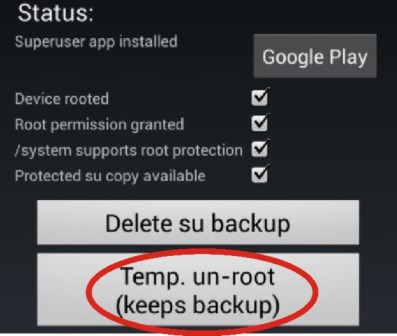
3.      Locate and click on “Protect Root”
Voodoo_OTA_Unroot
4.      Click on “Temp. un-root (Keeps backup)”
Voodoo_OTA_Unroot2
5.      You can now run your System update safely.
6.      After updating your OS successfully, run the Voodoo OTA and restore your Superuser neatly.
7.      Remember that it works only on MTK phones and other devices that run the ext3/4 filesystem.
If you ever run into problems, drop a comment and we will help out

DISCLAIMER
Please note that changing IMEI is illegal in some countries (check your local telecom regulations), as such, we advise you to backup your original IMEI (copy it down somewhere) and reinsert it back when the promo ends.
ITy UNIT or its authors are not liable for any malfunction of phone or any loss of data (if it ever happens) when using any of the method here. USE IT AT YOUR OWN RISK!
Always remember to backup your Android phone using ClockworkMod or MTKTools Recovery should in case it gets brick.